Friday, January 16, 2015
Summer Boating Layout - Project Life My Way
http://biminimoose.blogspot.com/2015/01/pocket-scrapbooking-ch-anything-goes_6.html anything goes
Thursday, January 8, 2015
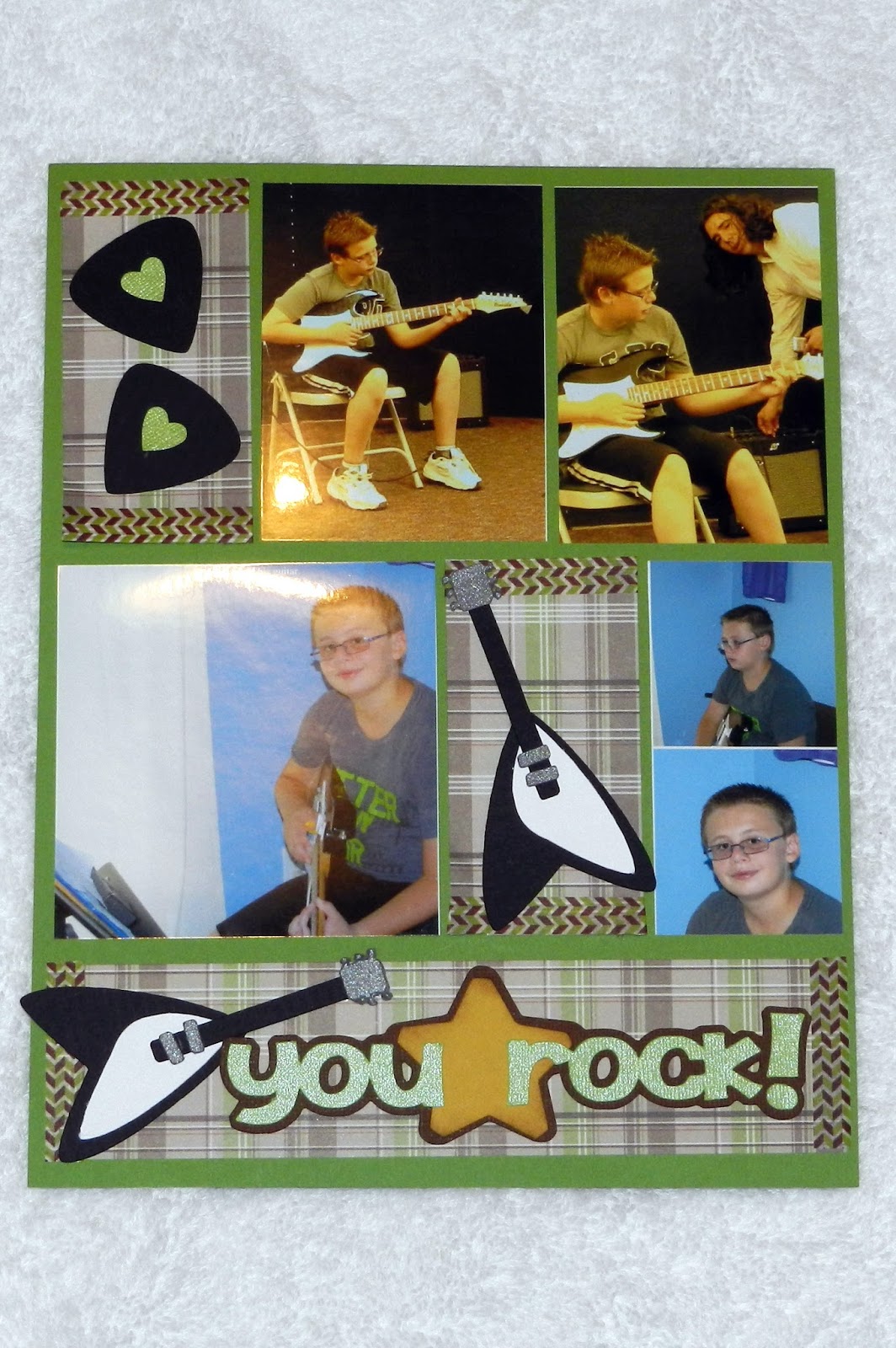
You Rock Layout - Project Life My Way
I haven't scrapbooked very much over the last year, quite simply, because I ran out of time. Making all my own embellishments and assembling them became so time consuming that I just hadn't done much. So in trying to "catch up" I went to a scrapbook retreat which was SO much fun. While I was there, many of the ladies were doing Project Life. Now I have heard of it but I still scrap 8.5 x 11 and so the sizes just didn't work for me. I did buy a bunch of page protectors in 8.5 x 11 and was going to use the same concept, but they were SO expensive and I have a couple boxes of regular page protectors. Well, I finally had a brainstorm. I decided to create my own project life pages in Make-the-Cut to fit MY needs in scrapbooking. Wow. It was really easy, it's geared exactly for the sizes that I use, and I can use the inexpensive page protectors that I already have. I have 25 pages of "options" that I can use or modify to create my own project life layouts. I just have to select the "pages" that will work with my photos, pick my papers, cut, and assemble. It is so much faster. Here's another example of my version of Project Life. I did make my own embellishments but it's still faster than doing it the other way. I still want to use the other way for a lot of pages, but this will be nice for "big events" that have TONS of pictures or just those odd pictures that seem to get pushed aside. It works great. Now I have more options in how I create and can save some time when needed. I love options.....
I even found a pocket scrapbook challenge to enter it into! Gotta love that!
http://biminimoose.blogspot.com/2015/01/pocket-scrapbooking-ch-anything-goes_6.html anything goes pocket style
Thursday, February 17, 2011
Gingerbread House Layout
Can I say I LOVE my Peachy Keen face stamps! I love how cute they make my gingerbread man look! This year we made gingerbread houses for our activity day girls and we had one left over and so after making my own for the very first time in my life, I brought the extra home with the intent of making another one and having my kids finish them. Well, my daughter didn't want to make one and so I turned my son loose and he had a ball. After decorating it once, he even picked all the candy off and ate it and then decorated it a second time to eat! It made me laugh. Well when I was looking through my pictures and things, I remembered I had this cute little font that had gingerbread images on it and so I loaded it into my MTC program and voila. I was really excited to see that it also had a mug and gingerbread cookie on it because there is a challenge going on here: http://sarahhurleychallenges.blogspot.com/2011/02/challenge-30-food-and-drink.html that I can even enter it into. You can't beat that....something I wanted to do and a challenge to boot! Have I mentioned lately that I love my MTC program! It always amazes me that no matter WHAT I choose to scrapbook, there is always a free alternative to a cartridge. This is a Lettering Delights font called DB Gingerbread Cookie that I got when they offered it as a free download. I love it! If you want it and watch their site, they often run sales for $1.00. That's a pretty cheap cartridge, but it was even better when I got it for 0.00! :-)
Wednesday, November 3, 2010
Print and Cut
Woohoo! I just had to try this new feature in the MTC beta version. This is my first attempt at print and cut! Who needs the Cricut Imagine???? Not me or anyone else who has this wonderful program! It's not exact....my printer is an HP and took a little tweeking, but for my first try, I'm not complaining! It wasn't too far off, but between my Cricut and the printer I had to adjust quite a little. I printed him at x=1 and y=1, but when I cut him, I had to adjust x=1.25 and y=.9375. It's late so I'll have to play some more another time with a different image and see if these numbers hold true, but for now, I'm pretty happy with the results. Interestingly, many Imagine customers aren't getting any better results with a $500 machine. Yikes. I've heard of several of them returning them because they didn't preform like they expected them too for the price. Overall, I'm quite pleased with the results! What do you think?
Sunday, August 15, 2010
Old Man Birthday Card
I've been pondering what type of card to make for my Dad this year. He really has a sense of humor and so I was searching online and found this poem...(which I changed just a bit)....
Just because it is your birthday
Don't despair, oh no
Overnight you won't discover
You've lost your get up and go.
Nor will you become all wrinkled,
Nor ache from head to toe.
So even though you are ripening
Don't regard it as a blow.
You won't suddenly become decrepit....
.... Cuz Mom said that happened long ago!
When I read this I had to laugh and knew that my Dad would smile so....off on the search for the perfect "things" to put on the card. I LOVE MTC as it allowed me to find this funny old man to use on this card! After a few minutes of tweeking, here he is! LOL.... (and no, my dad really isn't that old but..... grin .....
The car came from here (Thank you so much Amanda!) if you want to grab it ... http://amkscrap.blogspot.com/search?q=1915+model+t
Anyway, it seems manly cards are the hardest, but I LOVE how this one turned out! Do you like my old man?
Saturday, August 14, 2010
My daughter's frog....
Yesterday while I was making my other frogs, my daughter was playing with my light box and tracing/drawing some pictures of her own. She brought me this cute little frog and I couldn't resist. So after scanning him into my computer and then bringing him into MTC and manually fixing the breaks in the lines, this is now the cut file that I have for him. I actually haven't cut him yet, but it shouldn't be any problem. I love frogs, but haven't had any real cut files that I loved yet until now....yesterdays and this one. This one is my favorite! Thanks sweetie! I love him!Tuesday, April 27, 2010
SVG files and links
I figured if I put some of the links in one spot it would be easier for you to bookmark and find. I hope this helps. I would join yahoo groups (yahoogroups.com) and then join the make the cut forumn. There you can ask any questions and they have links and files that they share regularly. Some of those people are really knowledgable and can help you do anything you would like to do. Once you join, there are some help files, svg files, and links to help you find more files and how toos.
http://forums.surecutsalot.com/viewforum.php?f=13&sid=0743344e1be56d98d075b7581b6adebl
This is the Sure Cuts A Lot forumn, but they have tons of free SVG files that you can search for and download what you like. Some nice things.
http://www.scrappydew.com/tutorials/
this site has tutorials, free files, and files you can purchase. If you decide to purchase this software, they also gave me $20.00 worth of free files for buying the program through them. I used paypal when I purchased it and once I had the code, when I went into MTC, I just copied and pasted the code in the register box that pops up.
You can also search utube for make the cut videos. Many have been removed, but many some still remain.
http://www.scrappingtable.com/scalvsmtc.html
She sells SCAL, but has free SVG files and font files that she's cut and tested. Good info but not one of my favorites, but.....she's partial to SCAL and doesn't list some of the positives of MTC on her blog, but her files are nice and her free fonts listings are helpful.
http://dscrapbookingroom.blogspot.com/
This lady is amazing and very helpful. If you do a search on her blog, you can find just about anything that you could want. TONS of files.
http://svgcuts.com/blog/
This lady offers amazing free files all the time plus sells her files in kits for really good prices if you just want to buy some already to use. Her files are amazing and she has tons of different kits you can buy.
http://www.teddybear-treasures.com/
This is the site that has the cute witch and Halloween people you liked in my scrapbook pages.
She sells her files if you are interested.
http://stackyscraps.com/
She has lists of free SVG sites and coloring book sites along with tutorials on her blog.
http://www.treasureboxdesigns.com/category_16/FREEBIE-Treasure-Box-Tuesdays.htm
This is one of my favorite sites. Every Tuesday, she gives away free files and often runs sales on her other files. She has some adorable sets which only cost on sale $5.99 and you get lots of super cute designs. I
http://wandascrafts.blogspot.com/
Tons of free card files on her blog
http://scale-files.blogspot.com/
http://imagesbyheatherm.wordpress.com/
http://mardenz.blogspot.com/
lots of cartoon characters & scout info files
http://pennyduncancreations.blogspot.com/p/svg-cut-files.html
This lady manages the SCALHints forum group and is an amazing artist. She has TONS of beautiful free SVG files on her blog. But beware, you'll be here a while when you stop! LOL.
http://theladywolf.blogspot.com/
http://southernbellesvg.blogspot.com/
tons of free files on her blog. She created her own faux lifes a beach cartridge and has many other images on her site if you just follow her blog. I think if you follow her blog, she also made a faux kitchen set like the cartridge.
I have tons more, but these ought to get you started. Don't forget to check out fonts and dingbats....and coloring pages....
here are a couple of links to start you that direction...
http://www.dafont.com/search.php?psize=m&q=dingbats
http://www.houseoflime.com/
http://www.fontspace.com/
Remember when you are downloading fonts to NOT install them on your computer. Too many fonts on your computer will slow it down. Download them into a folder under MTC called fonts and store them there and then load them in using MTC.
http://cleversomeday.wordpress.com/
She has a comparison on MTC, SCAL, and Design Studio on her blog. She also has lists of fonts that match the cricut cartridges and she uses her cricut to the full extend and does amazing reviews of different techniques that you might want to try someday. Her blog is a must for Good info not found anywhere else.
Anyway, this is getting quite long, but it will get you started. Good luck!
Tuesday, December 22, 2009
Make the Cut
If you want to check it out, look up on the right hand top corner of my blog and there are some links to the Make-the-Cut website to purchase or just learn more about it.
There is also a free download so give it a try! The free download does cut a line across your image, but you can try it to see if you like it!
Have fun!
****Update*****They have fixed all the issues that I mentioned above and added so much, much more! It's awesome! Woohoo.....********